Saam Geaars Admin Dashboard
We built it for: Saam Geaars
Custom Admin Panel Development: SaamGeaars Manufacturing Dashboard Case Study
SaamGeaars already had a public-facing corporate site built by Team Code. What they needed next was the operational backbone behind it, a private admin panel that could run the actual manufacturing floor: job tracking, raw material stock, supplier orders, and client paperwork, all from one place. We had two weeks to build it.
The Challenge: Manufacturing Operations Running on Disconnected Processes
A gearbox manufacturer doesn't just need a pretty dashboard, it needs a system that mirrors exactly how a job moves through the shop floor. Before this project, SaamGeaars had no single system tying together:
- Client and project data. Company records, contact details, and purchase orders lived without a structured link between them.
- Job progress tracking. Each job passes through a defined sequence of manufacturing processes, and there was no way to see where a job actually stood at any given moment.
- Raw material stock. Material usage wasn't tied to actual job consumption, making stock counts unreliable.
- Client-facing paperwork. Quotations and purchase orders were handled outside any system with database backing, with no easy way to export or reference past documents.
SaamGeaars needed custom admin panel development built specifically around their manufacturing workflow, not a generic off-the-shelf tool forced to fit.
The Goal
Design and build a private /admin panel on top of the existing public site, backed by a real database, covering company and project management, a full job card system with process tracking, raw material inventory, supplier ordering, and exportable client documents, all inside a two-week window.
The Solution: A Manufacturing ERP Dashboard Built on Supabase
Team Code implemented a Supabase backend integration to give SaamGeaars a proper relational database behind every screen, then built the admin panel around the real sequence a job follows on the shop floor, from raw material intake to final dispatch.
Core Features
- Company master - records for every company with client and supplier flags, contact person, phone, email, and GST number in one place
- Project master - projects linked to client companies only, tracking PO number and order date
- Task master - part number, drawing number, and item description tied to each task
- Job Card system - the core of the dashboard, linking a company, its PO number, and a task together, with quantity, cost per unit, and due date entered per job
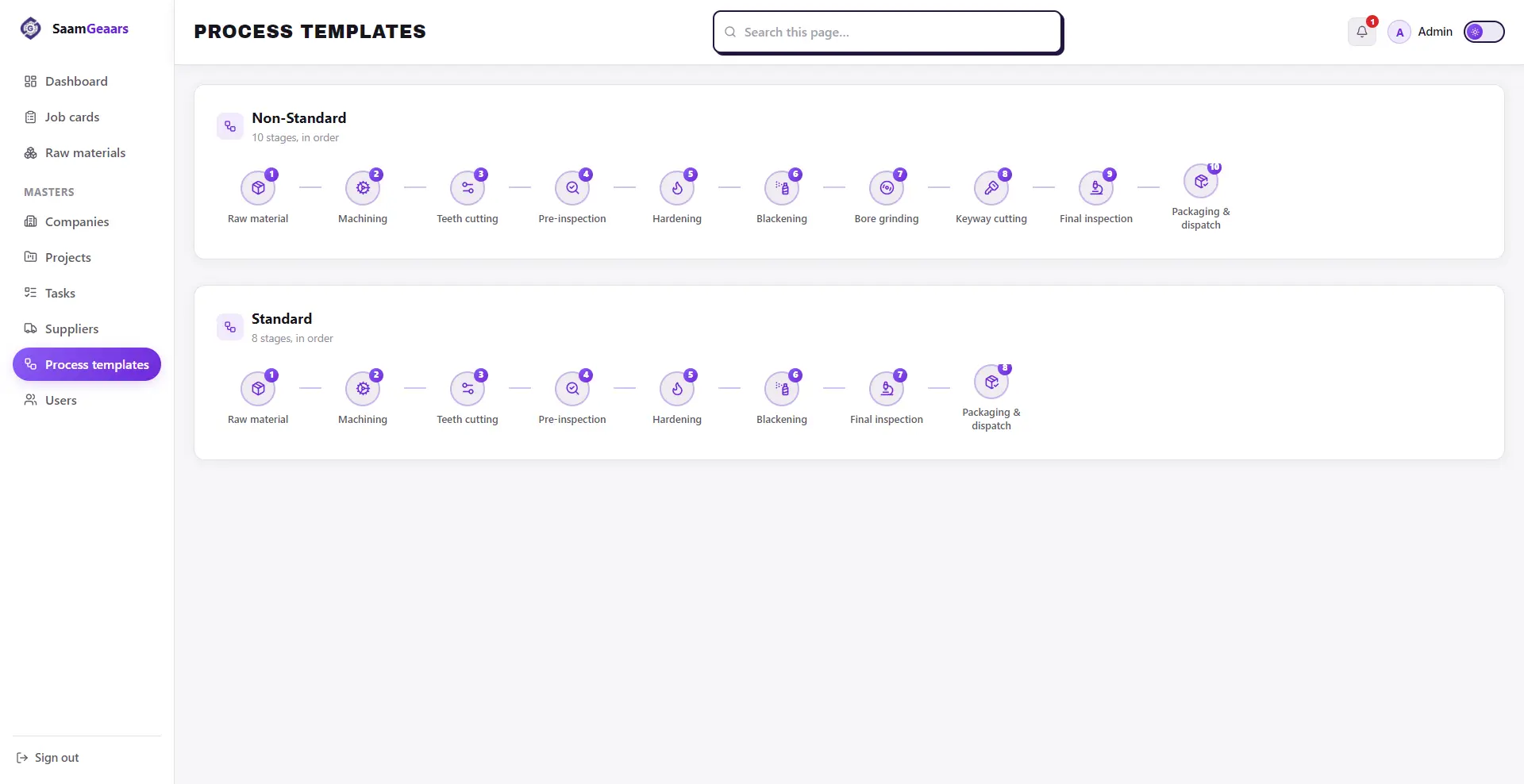
- Process template engine - standard and non-standard manufacturing sequences (raw material, machining, teeth cutting, pre-inspection, hardening, blackening, bore grinding, keyway cutting, final inspection, packaging and dispatch) applied automatically in the correct order
- Live process status tracking - each process in a job card moves through Acquired, On-Process, Completed, or Not Completed
- Raw material master with automatic deduction - stock is only editable through supplier orders, and material entered into a job card's raw material process deducts directly from live stock
- Supplier ordering workflow - raw material orders are placed first, then marked received, which is what actually increases stock, keeping the count honest
- Quotation and Purchase Order masters - multi-item quotations and POs with PDF export, plus job card export to Excel
Technology Stack
Built on React.js, Supabase, PostgreSQL, and TailwindCSS, the stack gave SaamGeaars a real relational backend without the overhead of managing infrastructure themselves, while keeping the front end consistent with their existing public site.
Our Development Process
- Schema design around the job card workflow - mapping company, project, task, and process relationships before building a single screen
- Master data modules first - company, project, task, raw material, and supplier masters built as the foundation everything else depends on
- Job card and process engine - the core feature, linking every master together into a single trackable workflow with live status per process
- Document and export features - quotation and purchase order masters with PDF export, plus Excel export for job cards
- UI refinement pass - adjusting the existing design system for dark mode, adding pagination with loading states across every screen, and reworking the dashboard's priority job cards into an actual card layout with global search
Key Challenges We Solved
Keeping raw material stock honest. Stock couldn't just be a number someone edits by hand. We built it so material only enters the system through a supplier order marked as received, and only leaves through actual consumption inside a job card's raw material process, so the count always reflects reality.
Linking data without duplicating it. A job card touches company, project, task, and process data all at once. Rather than re-entering information at each step, the job card pulls related PO numbers and company names automatically, whether the user starts from the company or the PO number directly.
Preserving existing design while fixing what didn't work. The brief was explicit: don't break existing features or design, just fix what's broken. The bold, brutalist UI style worked well in light mode but fell apart in dark mode, and an odd purple accent didn't fit the brand. We adjusted borders and shadows for dark mode and removed the mismatched color, without touching anything else in the design system.
Results
- Master modules integrated : 9+
- Development timeline : 2 weeks
- Raw material tracking : Real-time, deduction-based
The Impact
This custom admin panel development project gave SaamGeaars a single system for running their manufacturing operations end to end. What used to live across disconnected records now flows through one job card workflow, from raw material stock through every manufacturing process to final dispatch, with quotations and purchase orders generated and exported without leaving the dashboard.
Why This Matters for Manufacturers Considering an Admin Dashboard
Most manufacturers patch together spreadsheets, paper job cards, and separate ordering processes because off-the-shelf ERP tools rarely match how their specific shop floor actually works. A manufacturing ERP dashboard built around your real process sequence, not a generic template, means every status update, stock deduction, and document export reflects what's actually happening on the floor, not just what a rigid system assumes should be happening.